What Is Vibe Coding? How AI Is Changing the Way We Build Software
Updated on October 02, 20268 minutes read
What Is Vibe Coding?
Vibe coding is a style of software development where a person describes what they want in natural language, and an AI tool generates the actual code. Instead of writing every line by hand, the developer (or non-developer) prompts an AI assistant, reviews what it produces, and iterates through further prompts until the result works.
The term captures something real about how this process feels: you're steering by intent and outcome rather than by typing every implementation detail yourself. That doesn't mean the code is written carelessly. It means the primary interface for building has shifted from syntax to instructions.
Why Did the Term Emerge?
The term "vibe coding" emerged as AI coding assistants became capable enough to generate substantial, working code from a short description rather than just autocompleting a line or two. As these tools improved, a growing number of people, including those with limited traditional programming experience, found they could build functional applications by describing what they wanted and refining the output through conversation.
This shift is worth naming because it changes who can participate in building software, and it changes what skills matter most during the process. Understanding AI's current capabilities and limits, rather than memorizing syntax, becomes a bigger part of the job.
How AI-Assisted Coding Changes the Development Workflow
Traditional development typically starts with a specification or design, followed by writing code line by line, testing it, and debugging based on direct knowledge of exactly what was written. AI-assisted development compresses part of that process: you describe the desired outcome, the AI produces a first draft of the implementation, and you evaluate, test, and refine from there.
This doesn't eliminate the need for technical judgment. It moves that judgment earlier in the process, toward describing requirements clearly, and later in the process, toward reviewing and validating what was generated. The middle step, manually typing every line, becomes smaller, but the surrounding responsibilities don't disappear.
Traditional Coding vs. AI-Assisted Development
| Aspect | Traditional Coding | AI-Assisted Development |
|---|---|---|
| Primary interface | Writing code directly | Describing intent through prompts |
| Speed of first draft | Slower, built incrementally | Fast, generated in one pass |
| Where judgment is applied | Throughout implementation | Requirement framing and output review |
| Skill emphasis | Syntax and implementation detail | Problem framing, review, and testing |
| Risk of misunderstanding | Lower, developer controls each line | Higher, generated code may miss intent |
Neither approach replaces the other entirely. Many real projects blend both: AI generates a starting point, and a developer refines, corrects, and extends it using traditional coding skills.
Idea, Prompt, Generated Code, Iteration
A typical vibe coding workflow follows a loop rather than a straight line.
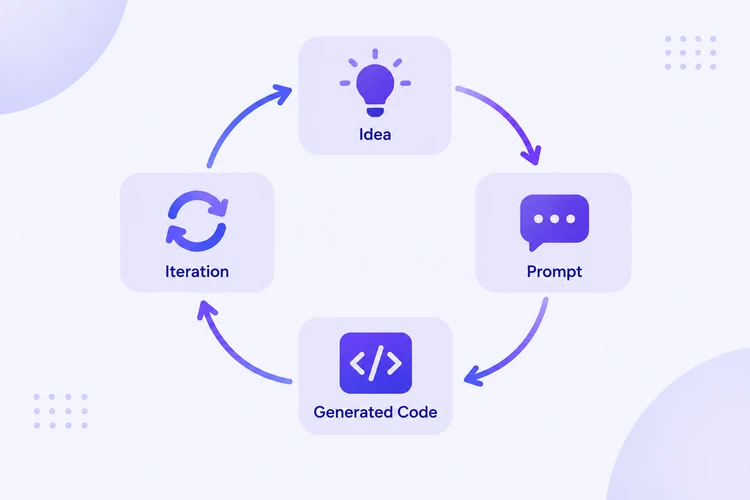
Idea. You start with a goal: a feature, a small app, or a fix for a specific problem.
Prompt. You describe that goal to an AI tool, ideally with enough detail about constraints, inputs, and expected behavior to reduce ambiguity.
Generated code. The AI produces a working draft based on your description.
Iteration. You test the result, notice gaps or errors, and refine the prompt or the code directly, repeating this cycle until the output meets the actual need.
This loop can move fast, but its quality depends heavily on how clearly the idea and constraints were communicated at each step, and how carefully the output was actually checked.
Where Vibe Coding Works Well
Vibe coding tends to work well for early-stage prototyping, where the goal is to test an idea quickly rather than build a polished product. It's also effective for building minimum viable products (MVPs) meant to validate a concept, generating boilerplate or repetitive code that follows familiar patterns, and helping non-developers or early-stage founders explore whether an idea is technically feasible before investing in a full build.
In these contexts, speed and iteration matter more than long-term code structure, which plays to AI-assisted development's strengths.
Where It Can Go Wrong
The same speed that makes vibe coding useful for prototyping can create problems when the stakes are higher. Generated code can look correct while containing subtle logic errors that aren't obvious without careful review. It can also introduce security vulnerabilities, especially around authentication, data handling, or input validation, if the person reviewing it doesn't know what to check for.
Beyond individual bugs, code generated quickly through many iterative prompts can accumulate inconsistent patterns, making it harder to maintain as the project grows. Without someone who understands the underlying logic, small issues can compound into a system that's difficult to debug or extend later.
Why Understanding Generated Code Still Matters
Even when AI writes the first draft, someone still needs to understand what that code actually does. This matters for a few concrete reasons: debugging requires knowing how the pieces fit together, extending a feature requires understanding the existing logic rather than guessing at it, and catching subtle errors requires the ability to read and reason about code, not just run it and see if it appears to work.
Treating generated code as a draft to review, rather than a finished product to trust blindly, is the difference between vibe coding as a productivity tool and vibe coding as a liability.
Testing AI-Generated Software
Testing matters at least as much with AI-generated code as with hand-written code, arguably more, since the person testing it didn't necessarily write every line themselves. Practical testing practices include running the code against realistic inputs, not just the example the AI was given, checking edge cases the AI may not have considered, such as empty inputs or unexpected data types, and using automated tests where possible, so regressions are caught early as the code is iterated on further.
Skipping testing because "the AI wrote it and it looked fine" is one of the most common ways vibe-coded projects run into trouble once real users start interacting with them.
Security and Maintainability Considerations
AI-generated code can follow insecure patterns, especially around handling user input, storing credentials, or managing permissions, without the person prompting it realizing anything is wrong. A few practical safeguards include reviewing any code that touches authentication, payments, or personal data with extra scrutiny, avoiding hardcoded secrets or credentials in generated code, and running standard security checks or linters rather than assuming generated code is automatically safe.
Maintainability is a related concern. Code that works today but was assembled through many disconnected prompts can be harder for anyone, including the original author, to modify confidently later.
Prototyping vs. Production
The distinction between prototyping and production matters more in AI-assisted development than it might initially seem. A prototype exists to answer a question: does this idea work, and is this approach viable? Speed matters more than long-term structure at this stage. Production code needs to be reliable, secure, and maintainable over time, often by people other than whoever originally wrote it.
Code that started as a vibe-coded prototype can become production code, but that transition usually requires a deliberate review pass: restructuring, adding proper tests, and addressing the shortcuts that were reasonable during early exploration but aren't acceptable in a live system.
Skills Developers Still Need
Vibe coding shifts some responsibilities, but it doesn't eliminate the need for core technical skills. Developers still benefit from understanding how to read and evaluate code, even code they didn't write themselves, knowing how to debug effectively when generated code doesn't behave as expected, and understanding system design well enough to guide the AI toward a coherent architecture rather than a collection of disconnected pieces.
Prompting skill matters too, since a vague or ambiguous prompt tends to produce code that technically runs but doesn't actually solve the intended problem.
Is Vibe Coding Replacing Software Development?
Vibe coding changes how code gets written, but it doesn't remove the underlying engineering work of defining requirements clearly, structuring a system sensibly, testing thoroughly, and maintaining it over time. What's changing is where a developer's time and attention go: less on typing every implementation detail, more on framing problems, reviewing output, and making architectural decisions.
For simple, well-defined tasks, AI-generated code can be close to final. For anything involving real complexity, security requirements, or long-term maintenance, human judgment remains central to the process, not optional.
A Responsible AI-Assisted Development Workflow
A practical, responsible approach to vibe coding generally includes a few habits: writing clear, specific prompts rather than vague requests, reviewing generated code before running it in any meaningful environment, testing thoroughly rather than assuming correctness from a working demo, and treating security and data handling with the same scrutiny you would apply to hand-written code.
This doesn't slow the process down as much as it might seem. It simply directs effort toward the parts of the workflow that actually determine whether the resulting software is reliable.
Conclusion
Vibe coding represents a real shift in how software gets built, driven by AI tools capable of generating substantial, working code from natural-language descriptions. It's genuinely useful for prototyping, MVPs, and exploring ideas quickly, but it doesn't remove the need for testing, security awareness, and the technical judgment required to understand what's actually being built.
Readers interested in applying AI-assisted development to real projects often benefit from hands-on practice across product discovery, MVP planning, frontend and backend development, working with APIs, and deployment. One structured way to build these skills is through Code Labs Academy's self-paced course, AI: Vibe Code To Production, which covers this kind of practical, end-to-end workflow.